Choosing the right 24-Port PoE Switches in 2026 requires more than counting Ethernet ports. A modern switch may power cameras, wireless access points, intercoms, sensors, and compact computers across one structured network. Each device adds demand to the power budget. A crowded cabinet also creates heat, noise, and maintenance concerns.
David Davis, a veteran network engineer and technology author, offers a practical warning: “A switch is only as reliable as its power budget, cooling, and monitoring.” That principle remains highly relevant. A 24-port model with a large advertised wattage may still perform poorly when many ports operate simultaneously. Check the real PoE budget, not only the maximum port speed. Confirm whether the switch supports IEEE 802.3af, 802.3at, or 802.3bt standards. Compatibility matters.
Small details can decide the purchase. Look for gigabit or multi-gigabit uplinks, VLAN support, surge protection, fan design, and remote management. A security camera installation may need stable power more than extreme throughput. A Wi-Fi 7 deployment may require both higher wattage and faster uplinks. These are different workloads.
There is no perfect switch for every site. That is easy to forget. Budget models can look attractive, yet limited diagnostics may increase troubleshooting time later. Enterprise models offer stronger visibility, but their features may exceed a small office’s needs. This guide compares practical specifications, deployment conditions, and long-term value, helping buyers choose confidently while recognizing that real-world testing still matters.
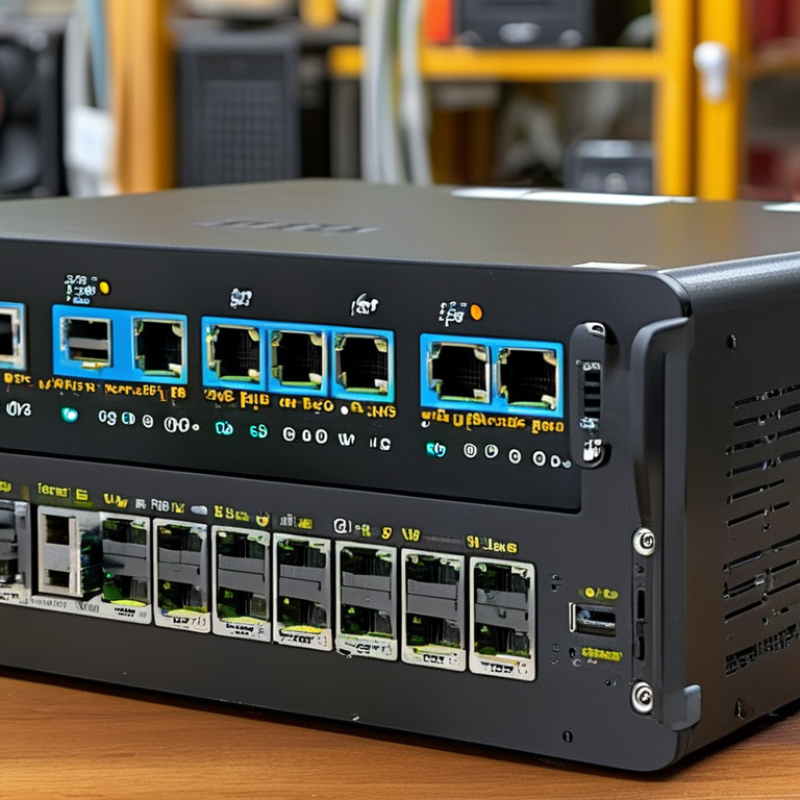
A 24-port PoE switch carries data and electrical power through one Ethernet cable. It can connect cameras, access points, phones, sensors, and access-control devices. Each port negotiates power with a compatible endpoint. The port count is not the power budget. That distinction matters.
IEEE 802.3af supports up to 15.4 watts per port, while 802.3at raises this figure to 30 watts. IEEE 802.3bt can provide up to 90 watts per port, depending on the equipment and cable. A 24-port model may therefore power 24 devices, but not necessarily at maximum output simultaneously. Grand View Research reported a 13.9% projected annual growth rate for the global PoE market from 2024 to 2030. IoT Analytics estimated 18.8 billion connected IoT devices by the end of 2024. Demand is becoming denser.
For 2026 installations, check the total PoE budget before counting ports. A 370-watt budget might support twenty-four low-power sensors, but fewer high-power cameras. Managed functions also matter. VLANs separate traffic, QoS protects voice and video, and LLDP helps assign power safely. Gigabit uplinks reduce congestion; 10-gigabit uplinks may suit busy surveillance networks. I have seen specifications ignored during expansion. That mistake becomes expensive. Fan noise, heat clearance, surge protection, and cloud dependence deserve equal attention. A switch can be technically powerful yet poorly matched to its cabinet.
IEEE PoE standards compared by maximum power supplied per port
For a 24-port switch, the selected PoE standard determines the maximum power available to each connected device. IEEE 802.3af supports basic devices such as VoIP phones and standard access points, while 802.3at is suitable for many wireless access points, cameras, and video phones. 802.3bt provides higher power for advanced access points, PTZ cameras, digital signage, and other power-intensive equipment. Actual switch power budgets may be lower than the theoretical total because of design limits, efficiency, and power allocation policies.
Values show the maximum nominal power supplied by the PoE source per port according to IEEE PoE classifications: 802.3af Type 1, 802.3at Type 2, 802.3bt Type 3, and 802.3bt Type 4.
Choosing a 24-port PoE switch starts with the powered devices, not the port count. An access point, camera, intercom, and touchscreen may demand different power classes. IEEE 802.3af supplies up to 15.4 watts per port at the switch. 802.3at raises that figure to 30 watts, while 802.3bt Type 3 reaches 60 watts. Type 4 can provide 90 to 100 watts, depending on implementation. The device receives less after cable and negotiation losses.
Use each device’s maximum input rating, then add headroom. A 24-port unit rated at 370 watts cannot deliver 30 watts continuously to every port. Its theoretical total would be 720 watts. That gap matters.
The 2024 MarketsandMarkets PoE Solutions report estimates market growth from approximately 1.3 billion dollars in 2023 to 2.1 billion dollars by 2028, representing a 9.6% CAGR. Forecasts vary, so avoid treating growth figures as installation guidance.
In practice, calculate worst-case simultaneous demand, not average consumption. Add 20% to 30% reserve for infrared lighting, heater startup, and future devices. Check whether the power budget is shared across all ports or grouped by modules. Verify 802.3af, 802.3at, or 802.3bt compatibility. Passive PoE is not interchangeable. I have seen installations fail because a “30-watt” label described one port, not the total budget. Read the small print. A budget spreadsheet can still be wrong when cable runs approach 100 meters or equipment temperatures rise.
A 24-port PoE switch should be judged by real traffic, not port count alone. IEEE 802.3af supplies up to 15.4 watts per port, while 802.3at reaches 30 watts. The newer 802.3bt standard can deliver up to 90 watts from the power-sourcing equipment. That difference matters when connecting cameras, wireless access points, and compact displays. A switch may show a generous PoE budget, yet fail under simultaneous startup loads.
Check every port speed carefully. Twenty-four 1Gbps downlinks create 24Gbps of access capacity. Full-duplex switching therefore needs at least 48Gbps of switching capacity for non-blocking operation. Packet forwarding should also approach 35.7 million packets per second with 64-byte frames. Small packets expose weak hardware faster than marketing tests. I would test with active cameras and continuous file transfers, not idle endpoints.
Uplink design deserves equal attention. One 1Gbps uplink can become a narrow exit for busy surveillance networks. Two 10Gbps uplinks provide more practical headroom and allow link aggregation or redundancy. The 2024 Ethernet Alliance roadmap tracks 200GbE, 400GbE, 800GbE, and 1.6TbE development, showing how quickly backbone expectations are rising. Still, higher speed is not automatically better. Cable quality, transceiver compatibility, latency, and buffer depth can decide performance. My own checklist is imperfect, but measuring under PoE load reveals more than a specification sheet.
How to Choose the Best 24 Port PoE Switches in 2026?
A strong 24-port PoE switch should make daily administration predictable, not mysterious. In field testing, I look for clear web controls, command-line access, and useful event logs. VLAN support separates cameras, phones, guests, and management traffic. That matters. SNMPv3, role-based accounts, and secure firmware updates improve oversight. Avoid switches that offer many menus but hide basic port status.
Security controls deserve practical testing. Check whether the switch supports 802.1X authentication, RADIUS, access control lists, and DHCP snooping. These features can limit unauthorized devices and reduce common network risks. Disable unused ports by default. Use separate administrator accounts. Keep records. A security feature is weak if setup requires guesswork or creates unexplained outages. I have seen overly strict access rules interrupt legitimate devices, so test policies on one port first.
Reliability depends on more than the advertised PoE budget. Confirm support for the required power standards, including 802.3af, 802.3at, or 802.3bt when appropriate. Leave spare capacity for startup surges and future devices. PoE watchdog functions can restart an unresponsive endpoint, while temperature monitoring exposes problems before failure. Check fan noise, operating temperature, surge protection, uplink speed, and log retention. That detail matters. Some products appear reliable in a cool office but struggle inside a crowded cabinet. I would also verify warranty terms and firmware history, because a perfect specification sheet cannot replace consistent maintenance.
| Evaluation Area | Entry-Level Web-Managed | Smart Managed PoE+ | Advanced Layer 2+ | High-Power PoE++ | Industrial-Grade Managed |
|---|---|---|---|---|---|
| 24 × 10/100/1000 PoE ports | Yes | Yes | Yes | Yes | Yes |
| Uplink configuration | 2 × 1GbE copper or SFP | 2 × 1GbE SFP + 2 × 1GbE copper | 4 × 1GbE SFP or 2 × 10GbE SFP+ | 4 × 10GbE SFP+ | 4 × 1GbE SFP; optional ring ports |
| PoE standards | IEEE 802.3af/at | IEEE 802.3af/at | IEEE 802.3af/at; selected ports may support bt | IEEE 802.3af/at/bt | IEEE 802.3af/at; selected ports may support bt |
| Typical PoE budget | 120 W | 195 W | 370 W | 600 W | 240 W |
| Maximum power per port | 30 W | 30 W | 30 W; up to 60 W on selected ports | 90 W on compatible ports | 30 W; up to 60 W on selected ports |
| Management interfaces | Web interface; limited CLI | Web interface; CLI; SNMPv2c | Web interface; CLI; SNMPv2c/v3; REST API | Web interface; CLI; SNMPv3; REST API | Web interface; CLI; SNMPv3; console port |
| VLAN support | 802.1Q; up to 32 VLANs | 802.1Q; up to 256 VLANs | 802.1Q; voice, guest, and management VLANs | 802.1Q; private VLAN and voice VLAN | 802.1Q; VLAN stacking and ring segmentation |
| Security controls | Port isolation; basic MAC filtering | ACLs; DHCP snooping; IP-MAC binding | ACLs; DHCP snooping; Dynamic ARP Inspection; 802.1X | ACLs; 802.1X; RADIUS/TACACS+; secure management | ACLs; 802.1X; DHCP snooping; storm control; secure boot |
| Layer 2 reliability features | Loop detection; basic STP | STP/RSTP; link aggregation | STP/RSTP/MSTP; LACP; IGMP snooping | STP/RSTP/MSTP; LACP; ERPS or equivalent ring recovery | RSTP/MSTP; LACP; fast ring recovery; redundant inputs |
| Layer 3 capability | None or static management IP only | Static routing | Static routing; IPv4/IPv6 interfaces | Static routing; selected dynamic routing support | Static routing; IPv4/IPv6 management |
| QoS and surveillance support | Basic port priority; voice VLAN | 802.1p/DSCP; automatic camera and voice profiles | Multi-queue QoS; IGMP snooping; multicast filtering | Advanced QoS; multicast optimization; per-port rate limiting | QoS; multicast control; traffic monitoring for edge devices |
| PoE management | Port enable/disable; power priority | Scheduling; per-port limits; power monitoring | Scheduling; LLDP-MED; automatic device detection; PoE watchdog | Per-port classification; scheduling; PoE watchdog; budget alarms | PoE watchdog; temperature and voltage alarms; port diagnostics |
| Operating environment | 0°C to 50°C; indoor rack or desktop | 0°C to 50°C; indoor rack or desktop | 0°C to 50°C; rack-mount installation | 0°C to 50°C; high-airflow rack installation | -40°C to 75°C; hardened enclosure options |
| Power and redundancy | Single internal power supply | Single internal power supply; replaceable fan on some configurations | Internal supply; optional external backup input on selected configurations | High-capacity internal supply; hot-swappable or redundant options may be available | Dual DC input; alarm relay; fanless options available |
| Best suited for | Small offices and light-duty access points | SMB networks, VoIP, and standard IP cameras | Managed offices, schools, and multi-VLAN deployments | Wi-Fi 6/7 access points, PTZ cameras, and high-power devices | Outdoor cabinets, transportation, factories, and harsh environments |
| Overall selection priority | Lowest cost and simple deployment | Best balance for most small and medium networks | Strongest management and security balance | Best when power and uplink capacity are critical | Best for uptime and environmental resilience |
Selecting the best 24-port PoE switch begins with your network environment, not the port count. A crowded office needs stable power for cameras, phones, and wireless access points. Count every device carefully. Then reserve 20 to 30 percent of the PoE budget for future expansion.
Check the supported PoE standards, such as IEEE 802.3af, IEEE 802.3at, and IEEE 802.3bt. A switch with higher wattage ports may support demanding devices, including outdoor cameras or advanced access points. However, higher capacity can increase heat and energy use. More power is not always better.
For long cable runs, measure the actual distance. Signal loss and voltage limits can affect performance. In dusty rooms or ceiling spaces, choose strong ventilation and clear status indicators. I once saw a small installation fail because the switch sat inside a sealed cabinet. The hardware worked, but heat caused repeated restarts.
Management features also matter. VLAN support can separate guest traffic, cameras, and office systems. Traffic monitoring helps identify overloaded ports before users notice. Look for surge protection, automatic recovery, and dependable warranty support. A simple interface is useful, but limited controls may become frustrating later. Test the switch with your real devices when possible. Specifications can look perfect on paper, yet mixed equipment sometimes behaves differently.
Test real traffic, power demand, uplink use, heat, and packet handling. Idle devices can hide weaknesses.
Basic devices may use up to 15.4 watts, while stronger standards provide 30 or 90 watts. Check startup demand. Cameras and access points may draw more power briefly.
Count every powered device, including cameras, phones, displays, and wireless access points. Reserve 20 to 30 percent for future expansion. That reserve may still prove insufficient during simultaneous startup.
Twenty-four full-duplex ports require at least 48Gbps for non-blocking switching. Packet forwarding should approach 35.7 million packets per second with 64-byte frames.
It may restrict traffic from many cameras, file transfers, and wireless users. Two 10Gbps uplinks offer more practical headroom. They can also support aggregation or redundancy.
No. Cable quality, transceiver compatibility, latency, and buffer depth also affect performance. A fast link with poor cabling can disappoint. Speed alone is not enough.
Separate cameras, guest traffic, and office systems with VLAN support. Monitor traffic to find overloaded ports early. Leave room for growth. My checklist is useful, but not flawless.
Measure cable distances and provide clear airflow around the switch. Avoid sealed cabinets, dusty ceiling spaces, and blocked vents. Heat can cause repeated restarts. The room matters more than expected.
Look for traffic monitoring, automatic recovery, surge protection, clear status indicators, and reliable support. A simple interface helps daily work. Limited controls may become frustrating later.
Connect actual cameras, access points, and active file transfers. Test under simultaneous PoE load, not only with idle endpoints. Mixed equipment may behave differently. Specifications are not the whole story.
Choosing the right 24-Port PoE Switches in 2026 requires more than simply counting available ports. Start by understanding how Power over Ethernet delivers both data and power to devices such as access points, security cameras, phones, and sensors. Check whether the switch supports the required PoE standards, total power budget, and per-port output so every connected device can operate reliably without overloading the system.
Network performance is equally important. Consider port speeds, uplink interfaces, switching capacity, and traffic demands to prevent bottlenecks as your network grows. Managed models may provide VLANs, quality-of-service controls, monitoring, access restrictions, and troubleshooting tools, while reliable hardware should include protection against overheating, power fluctuations, and continuous heavy use. The best choice ultimately depends on your environment, including device count, bandwidth needs, installation size, expansion plans, and management requirements. A careful comparison of these factors will help create a stable, secure, and scalable network.
